

My basket0 items


Find your orders, invoices and saved addresses all in one place.
The Canon EOS R5 Mark II body only is a 45 MP full-frame mirrorless camera for detailed stills and moving subjects. Its stacked sensor and electronic bursts at up to 30 fps suit photographers who need cropping room as well as a choice of moments within an action sequence. Intelligent Dual Pixel AF supports tracking, while internal 8K RAW recording at up to 60p gives filmmakers options for demanding post-production. No lens is included. Keep your compatible Canon RF lenses or choose one for your main assignment, and allow for suitable cards, storage and editing equipment when planning the purchase.
Combine compatible accessories and save. The more items you add, the bigger the discount.
Accessory
Accessory
Accessory

warranty extension
It can be a strong choice if you need to follow fast action while keeping enough detail for crops, large prints and demanding video projects. Its 45 MP sensor gives you room to adjust a composition, fast bursts help you choose a precise moment, and internal 8K RAW gives filmmakers more options in post-production. It suits photographers and hybrid creators who will use those capabilities and are ready to plan for suitable lenses, cards and storage. If you mainly photograph still subjects or deliver simple 4K video, a less specialized body may cover your needs.
This body-only offer lets you keep compatible RF lenses or select a lens separately. Compare the Canon EOS R5 Mark II configurations if you also need an optic.

Having a detailed file helps when an animal remains at a distance, but it is only one part of wildlife photography. The direction of the light, your position and the chosen focal length determine what reaches the sensor. The R5 Mark II gives you scope to refine the frame afterwards, particularly when the final image does not need every pixel of the original. It still cannot take the place of appropriate reach.
For birds in flight, start with a shutter speed that suits the movement and decide how much of the frame the bird should occupy. Leave room for an unexpected change of direction. Subject tracking can assist with focus, while short bursts provide alternative wing positions. Review the results at a useful magnification and adjust your technique before assuming that a higher burst rate will solve a sharpness problem.
Pre-continuous shooting is especially relevant to subjects that change state abruptly. A bird can sit still for several minutes and leave before your finger finishes pressing. Learn the camera’s behaviour during the half-press and practise keeping the subject framed. If you need a matching telephoto setup, compare the R5 Mark II with RF 100-500mm L against buying the components separately. A support and a comfortable carrying arrangement may matter just as much during a long wait.
Sports photography often involves deciding which athlete matters before the action reaches you. Automatic subject recognition helps, but overlapping players and foreground obstacles can still require intervention. Configure a method of selecting or changing the tracked subject that you can use without searching through menus. Practising that movement is more useful than discovering a new focus mode during an important match.
At up to 30 fps electronically, the R5 Mark II offers closely spaced choices within a fast gesture. You might select a cleaner foot position, an unobstructed face or a particular moment of contact. Allow time for those files afterwards: faster capture also means more images to review, transfer and store. A short burst around a predicted moment usually produces a more manageable selection than an uninterrupted sequence.
Artificial lighting adds another consideration indoors. Check for banding or exposure changes with the shutter mode you intend to use. The appropriate response can involve changing settings or shutter mode rather than accepting a whole series with the same problem. Remember that the maximum electronic rate is conditional. Build your setup around consistent results in that venue, not simply the largest number in the specifications.
An event photographer can move from a spontaneous exchange to a formal group photograph within minutes. The R5 Mark II’s combination of resolution and subject tracking suits that variety. During the quick moments, focus selection and anticipation matter most. During a posed portrait, take time to check depth of field and the placement of the eyes. A detailed file makes small errors easier to see as well as preserving fine textures.
Lens choice has a strong influence on how comfortably you work indoors. A standard zoom with a wide maximum aperture can offer flexibility when there is little opportunity to move or add lighting. The Canon R5 Mark II and RF 24-70mm F2.8 L kit is a useful configuration to compare if that is the type of work you shoot regularly. Think about the weight over a full day and the focal lengths you already own before duplicating equipment.
Before a paid assignment, try out your recording setup and card behaviour. Decide how you will handle copies during the event and how you will transfer the files afterwards. A high-performance camera still needs a practical plan for batteries, full cards and unexpected interruptions. Those choices are much easier to make before guests arrive than while several things are happening at once.
For a portrait intended for print, 45 MP can preserve useful detail in hair, clothing and accessories. The extra resolution also leaves room for an alternative crop when the final layout changes. However, a very shallow depth of field still demands accurate focus and a suitable aperture. Inspect the relevant eye and consider whether the client needs more of the face or clothing to remain sharp.
Product photography benefits from consistency as much as resolution. Keep camera position, lighting and reflections under control so that a series feels coherent. A detailed sensor does not correct an uneven highlight or a distracting reflection. Before spending the remaining budget on camera accessories, consider whether better lighting or a more suitable lens would improve the photographs more directly.
The camera offers RAW and C-RAW options for stills. Choose a format your editing software supports and test the workflow before a large assignment. Use a repeatable file-naming and backup method so that different crops and revisions remain easy to identify. If you use in-camera upscaling, remember that the approximately 179 MP JPEG it can create is processed output; it is not a native 179 MP RAW capture.

Landscape work makes good use of resolution when the photograph will be printed large or examined closely. The details still depend on focus, lens performance and camera stability. A tripod can help with a deliberate composition, but moving water or leaves may require a different exposure decision from the stationary part of the scene. Stabilisation does not make every element in a landscape still.
For architecture, leave enough space around the building if you expect to adjust perspective during editing. Those adjustments can remove part of the frame. A carefully chosen shooting position is often preferable to relying on a severe correction afterwards. The R5 Mark II’s resolution offers useful flexibility, but it should support a considered composition rather than replace it.
Travel presents a different calculation: the equipment must be carried and used repeatedly. A versatile zoom may be preferable to several lenses that spend most of the trip in a bag. The R5 Mark II with RF 24-105mm F4 L is worth comparing if you want a broad standard range with fewer lens changes. Check whether its aperture and size match the places and times of day you tend to photograph.
The body-only version is especially appealing when you already have a travel lens you like. There is little benefit in purchasing another similar zoom simply because it comes in a bundle. Look at the complete system, including support and spare power, and decide what you can comfortably carry. The camera that stays accessible is more useful than an ambitious setup you repeatedly leave behind.
Internal 8K RAW recording at up to 60p is relevant when the production will benefit from substantial image information and room to reframe. It also brings demands on media, storage and processing. Start with the film you need to deliver. A fast-turnaround event film, a controlled commercial shoot and a long interview do not necessarily call for the same codec or resolution.
For slow-motion footage, 4K recording at up to 120p offers another tool. Use it for a reason: a specific gesture, a moving material or an action that is clearer when slowed down. Consider available light and the shutter setting needed for the intended look. Test the exact mode, since resolution alone does not describe the full recording format or its storage requirements.
Canon Log 2 and Canon Log 3 are useful options for a planned grading workflow. They require suitable exposure and post-production rather than simply being a setting that makes footage better. If the project has a short turnaround, choose a workflow you can complete reliably. Sound, lighting and camera support still have a direct effect on the finished film, regardless of how much detail the video file contains.
Long takes require preparation. Recording duration can depend on temperature, selected format and other operating conditions, so do not plan an important event around an assumption of unlimited recording. Run a realistic test, consider power and monitoring, and prepare an alternative for a sequence that cannot be interrupted. This camera’s video features are most useful when the rest of the production has been planned around them.
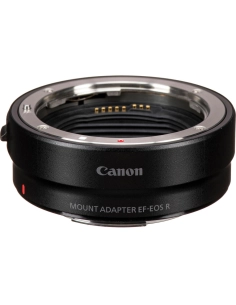
Canon RF lenses mount directly. RF-S lenses can also be used, with an APS-C crop that reduces the available resolution. EF and EF-S lenses require a compatible EF-EOS R mount adapter; EF-M lenses cannot be used. If you are moving from a DSLR, identify the exact lenses you intend to retain before deciding how much the move will cost.
Within the Canon EOS R camera range, the R5 Mark II is a strong candidate when you need high-resolution stills and demanding video in the same body. Match the lens to the assignment. A long wildlife zoom, a fast event lens and a small travel setup solve different problems. Buying the body only gives you control over that choice and can avoid duplicating an optic you already own.
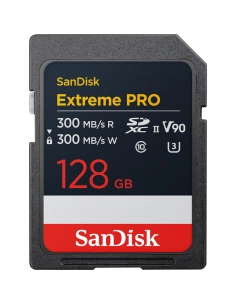
Use a suitable CFexpress Type B card for modes that require it, including high-data-rate RAW video. The UHS-II SD slot remains useful for many other purposes, within the limits of the selected mode. Read Canon’s requirements for your chosen combination of codec, frame rate and resolution. Capacity and sustained writing performance are different considerations, and both need to suit the work.
Budget for what happens after capture. A reliable card reader, organised storage and a backup routine help keep large projects manageable. Do not clear cards until your files are safely copied according to your working method. The Canon R5 Mark II price is only part of the investment if you also need lenses, media or a more capable editing system. Comparing complete setups gives you a more useful buying decision than comparing bodies alone.
The original EOS R5 already offers approximately 45 MP, so the Mark II is not simply a higher-pixel-count replacement. Its stacked sensor, updated autofocus and processing, and electronic shooting at up to 30 fps are the changes to assess for action. Internal 8K RAW at up to 60p may also be relevant if your films need that recording option.
If your existing R5 mainly photographs carefully arranged studio scenes or landscapes, identify the actual limitation before replacing it. A lens, lighting equipment or a better workflow may deserve priority. The Mark II makes more sense when the added functions address situations you encounter regularly. List those situations first; that makes the comparison much more useful than a general desire for a newer model.
The Canon EOS R6 Mark III offers 32.5 MP and electronic shooting at up to 40 fps under its stated conditions. The R5 Mark II is therefore not the automatic winner on burst rate. Its stronger reason for being on your shortlist is the 45 MP resolution and 8K video capability, where your work can use those features.
For fast delivery with limited cropping, the R6 Mark III deserves consideration. For larger prints, frequent cropping or a production that specifically needs 8K, the R5 Mark II may suit you better. Compare the lens and recording media you would purchase with each. Spending less on a body can sometimes leave room for a lens that matters more to the final photograph.
The R6 Mark III also records 7K RAW Light at up to 60p in 17:9. Lower resolution can mean smaller files at comparable settings, but codec and compression still matter. Compare the actual modes you will use rather than estimating file sizes from megapixels alone.
The Canon EOS R3 and Canon EOS R1 are also worth examining for work centred on action and sustained professional use. Consider their handling, integrated vertical-body design and the way you deliver images. Those choices can matter more than a single specification when you spend long periods photographing the same type of event.
The R5 Mark II is particularly appealing if you want 45 MP in a body without an integrated vertical grip and need it to cover a varied workload. Landscape, portrait, wildlife and video can all make use of different parts of its specification. Choose a more specialised body when its design fits your regular working conditions better, rather than assuming one model is best for every professional.

Start with the assignment you do most often. A feature is valuable when it solves a problem you actually encounter, whether that is choosing an exact moment from a burst or delivering several crops from one image.
At a basketball game, frame the play and photograph short bursts around the movement you expect: a player taking off, a pass arriving or a reaction near the basket. A maximum of 30 electronic frames per second gives you closely spaced moments, subject to the camera settings and shooting conditions. Holding the shutter throughout the game can leave you with a great many similar files. Shorter sequences help you find the strongest frame and spend less time copying and sorting images.
An animal can leave its perch before you fully press the shutter. With pre-capture enabled, the camera can retain up to 15 frames from before the full press. You still need to follow the subject and hold the shutter halfway in advance; it will not rescue a scene you never framed. Practice with the setting before an important trip, then review the files and decide whether the extra images are worth the storage for your subject.
Action Priority is designed for selected moments in soccer, basketball and volleyball. It can help identify a player involved in the action, but a crowded scene or a subject hidden behind another player can still call for your intervention. Learn the camera’s subject-selection controls and keep watching the result in the viewfinder. For other sports, choose tracking and subject settings that suit what you are photographing rather than assuming the same action mode covers every game.
Eye Control AF works differently: after calibration, your eye in the viewfinder helps indicate where you want the camera to select a subject. At a wedding, for example, this may help when you need to move attention between people in a group. Calibration and results depend on the user and viewing conditions, so try it with the glasses or contact lenses you normally wear and keep a familiar manual selection method available.
The CFexpress Type B and SD UHS-II slots give you options for organizing files, but the available recording combinations depend on the mode and cards used. Test your setup before a paid event and check Canon’s card guidance for demanding video formats. After the shoot, copy files to separate storage before clearing a card. A second card slot is useful, but it is not a complete backup plan by itself.
For an interview destined for a website, standard 4K may be easier to store and edit than an 8K RAW recording. For extended recording, plan around the selected format, power supply and temperature. The optional CF-R20EP cooling grip is purchased separately and may help in suitable setups; it does not promise unlimited recording in every environment. Test the configuration you intend to use on location.

Dual Shooting can capture still photos while video recording continues. This can be useful at an event when you need a few photographs for a quick update without stopping the video. In this mode the video is Full HD and the stills are 16:9 JPEG files of approximately 33.2 MP. Insert two cards before turning on the camera: video is recorded to card 1 and photos to card 2.
Canon specifies up to approximately 7.5 still frames per second with the NTSC system setting or 6.2 with PAL in the high-speed setting. Simultaneous still capture is unavailable with RF-S or EF-S lenses. Treat the feature as a useful way to cover both tasks, not a replacement for a full-resolution RAW photo session or 8K recording.
Choose the lens around the distance and light you expect. A standard zoom is flexible for events, a bright prime can suit a portrait session, and a telephoto lens becomes important when wildlife remains far away. Compatible RF lenses mount directly; EF and EF-S lenses require a compatible adapter. Check the combination before ordering, especially when a particular recording mode matters to you.
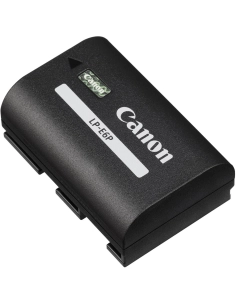
Add suitable cards, a backup destination and any extra battery you need to the budget. For video, consider a microphone and support as well. These choices determine how ready the camera is for your first assignment and help you decide whether the body-only offer makes sense with equipment you already own.
We recommend the Canon EOS R5 Mark II body only to photographers who already have suitable RF lenses and need both detailed files and capable action handling. It also makes sense for experienced hybrid shooters who have planned the recording and editing side of their video work. The reason to buy should be practical: more freedom to crop, more choice within an action sequence or a recording format your projects genuinely require.
Allow time to learn the focus controls and recording settings. A capable camera does not remove those decisions, and a rushed setup can hide the benefit of the features you paid for. If buying the body leaves no budget for the right lens or suitable media, reconsider the balance of the purchase. A complete, usable kit will serve you better than an impressive body with an unresolved gap in the equipment.
Before ordering, check your intended lens, memory card and editing workflow against the work you shoot most often. If those are already in place and the R5 Mark II’s capabilities solve a clear limitation, the body-only version lets you develop your system without buying a duplicate kit lens. That is the situation in which we consider it a well-judged addition to an existing Canon setup.

No. This Canon EOS R5 Mark II is supplied without a lens. You can use a compatible lens you already own or choose one separately. The dedicated box-contents section lists the accessories supplied with the camera.
Yes. Its stacked full-frame sensor provides approximately 45 effective megapixels. The in-camera upscaling option can create an approximately 179 MP JPEG under the specified conditions, but that is processed output rather than a native 179 MP RAW capture.
Yes, with a compatible EF-EOS R mount adapter. RF and RF-S lenses mount directly. EF-S and RF-S lenses use an APS-C crop that reduces the available resolution. EF-M lenses cannot be used.
No. Up to 30 fps refers to electronic shooting under Canon’s stated conditions. The actual result depends on the configuration and shooting conditions. Test your lens, battery and settings before relying on the highest rate for an assignment.
When enabled, it can retain up to 15 frames from before you fully press the shutter. You need to have started preparing the shot with the half-press and to keep the subject framed. This can help for sudden moments such as a bird taking off.
Use a CFexpress Type B card that meets Canon’s requirements for the selected recording mode. Check sustained writing performance as well as capacity. The UHS-II SD slot supports other compatible recording options, but it does not replace CFexpress for modes that require it.
No. It is most useful when the project benefits from its image information and the workflow can handle the files. For a quick delivery, a less demanding format may be more practical. Consider storage, editing time and the final output before choosing the mode.
No. Temperature, format and settings can affect recording duration. Test under realistic conditions and plan power, media and a backup option for sequences that cannot be interrupted. Do not assume unlimited recording from the maximum resolution specification.
Canon lists approximately 656 g for the body alone and 746 g with battery and memory card under its stated measurement conditions. Add the lens and accessories when considering the weight you will carry during an assignment.
The case is strongest if you need the stacked sensor, updated autofocus and processing, electronic shooting up to 30 fps or 8K RAW up to 60p. The original R5 already offers approximately 45 MP. Decide which changes address a limitation in your current work.
Choose according to output and workflow. The R5 Mark II offers 45 MP and 8K recording; the R6 Mark III offers 32.5 MP and electronic shooting up to 40 fps under its stated conditions. Neither wins every comparison. Include the lens and media in your budget.
Allow for a compatible lens, suitable cards and enough storage, plus any power or support equipment your work needs. Existing RF users may already own much of this. Comparing complete setups gives a more useful view of the Canon R5 Mark II price than comparing bodies alone.


Generated by AI from customer reviews.
